2. Supplementary - File permissions
File Permissions
Set-up
- Change directory to
~/shell_data/untrimmed_fastq - Make a backup directory with
mkdir backup - Make a copy of one of the fastq files and put it in backup
cp SRR098026.fastq backup/SRR098026-backup.fastq - Change directory to
~/shell_data/untrimmed_fastq/backup
We've now made a backup copy of our file, but just because we have two copies, it doesn't make us safe. We can still accidentally delete or overwrite both copies. To make sure we can't accidentally mess up this backup file, we're going to change the permissions on the file so that we're only allowed to read (i.e. view) the file, not write to it (i.e. make new changes).
View the current permissions on a file using the -l (long) flag for the ls command:
The first part of the output for the -l flag gives you information about the file's current permissions. There are ten slots in the
permissions list. The first character in this list is related to file type, not permissions, so we'll ignore it for now. The next three
characters relate to the permissions that the file owner has, the next three relate to the permissions for group members, and the final
three characters specify what other users outside of your group can do with the file. We're going to concentrate on the three positions
that deal with your permissions (as the file owner).
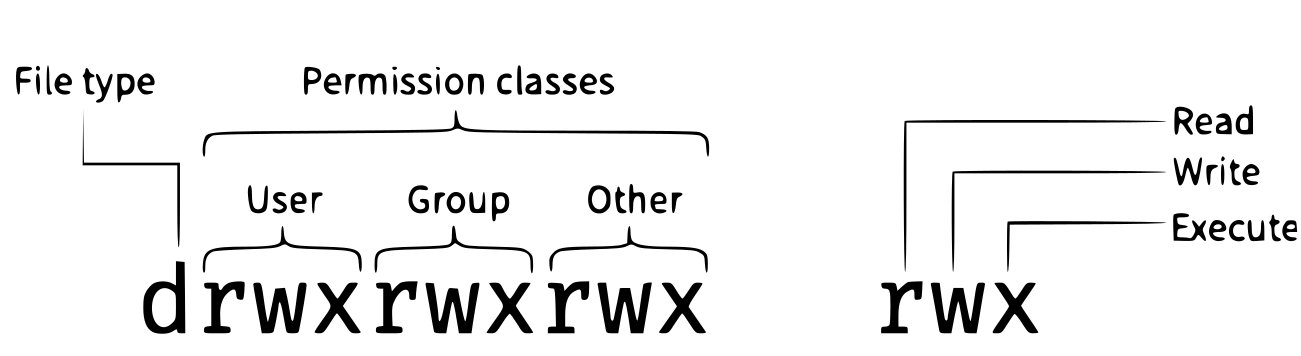
Here the three positions that relate to the file owner are rw-. The r means that you have permission to read the file, the w
indicates that you have permission to write to (i.e. make changes to) the file, and the third position is a -, indicating that you
don't have permission to carry out the ability encoded by that space (this is the space where x or executable ability is stored, we'll
talk more about this below on scripts).
Our goal for now is to change permissions on this file so that you no longer have w or write permissions. We can do this using the chmod (change mode) command and subtracting (-) the write permission -w.
code
Other useful chmod options
chmod +w file– Makes a file writable for everyonechmod -R -w directory– Removes write access recursively to a directory and everything in itchmod u+rwx,g-rwx,o-rwx file– Changes user, group and other separately in one commandchmod 644 file–rw-r--r--(Owner can read write, everyone else read only - good for most files)chmod 755 file–rwxr-xr-x(Owner can read write execute, everyone else read and execute only - good for scripts)chmod 600 file–rw-------(Owner can read write, everyone else no permissions - more secure)
Removing
To prove to ourselves that you no longer have the ability to modify this file, try deleting it with the rm command:
You'll be asked if you want to override your file permissions:
You should enter n for no. If you enter n (for no), the file will not be deleted. If you enter y, you will delete the file. This gives us an extra
measure of security, as there is one more step between us and deleting our data files.
Important: The rm command permanently removes the file. Be careful with this command. It doesn't
just nicely put the files in the Trash. They're really gone.
By default, rm will not delete directories. You can tell rm to
delete a directory using the -r (recursive) option. Let's delete the backup directory
we just made.
This will delete not only the directory, but all files within the directory. If you have write-protected files in the directory, you will be asked whether you want to override your permission settings.
Exercise
Starting in the ~/shell_data/untrimmed_fastq/ directory, do the following:
- Make sure that you have deleted your backup directory and all files it contains.
- Create a backup of each of your FASTQ files using
cp. (Note: You'll need to do this individually for each of the two FASTQ files. We haven't learned yet how to do this with a wildcard.) - Use a wildcard to move all of your backup files to a new backup directory.
- Change the permissions on all of your backup files to be write-protected.
Solution
rm -r backupcp SRR098026.fastq SRR098026-backup.fastqandcp SRR097977.fastq SRR097977-backup.fastqmkdir backupandmv *-backup.fastq backupchmod -w backup/*-backup.fastq
It's always a good idea to check your work withls -l backup. You should see something like:
Making a script into a program
Set-up
- Complete the workshop up to the end of Writing Scripts and Working with Data.
We had to type bash to run our script because we needed to tell the computer what program to use to run it. Instead, we can turn this script into its own program. We need to tell the computer that this script is a program by making the script file executable. We can do this by changing the file permissions.
First, let's look at the current permissions.
We see that it says -rw-r--r--. This shows that the file can be read by any user and written to by the file owner (you). We want to change these permissions so that the file can be executed as a program. We use the command chmod like we did earlier when we removed write permissions. Here we are adding (+) executable permissions (+x).
Now let's look at the permissions again.
Now we see that it says -rwxr-xr-x. The x's that are there now tell us we can run it as a program. So, let's try it! We'll need to put ./ at the beginning so the computer knows to look here in this directory for the program.
The script should run the same way as before, but now we've created our very own computer program!
You can learn more about writing scripts at the Data Carpentries lesson on automation.